At iGenius, we care about your devices' operation and useful life. Here are some points to consider when looking after Apple device batteries.
Update to the latest software
Keep your device updated. Apple software updates often include advanced energy-saving technologies, so make sure the device uses the latest version of iOS, macOS or watchOS.
Avoid extreme temperatures
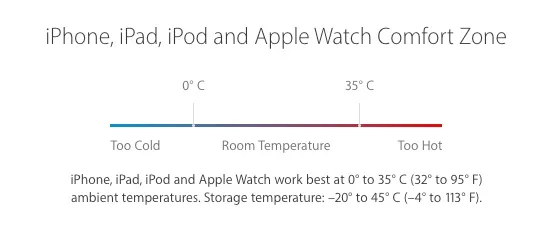
Apple devices are designed to work well over a broad temperature range. The article identifies 16°–22°C as the ideal range. Avoid exposing the device to ambient temperatures above 35°C because this can permanently reduce battery capacity.
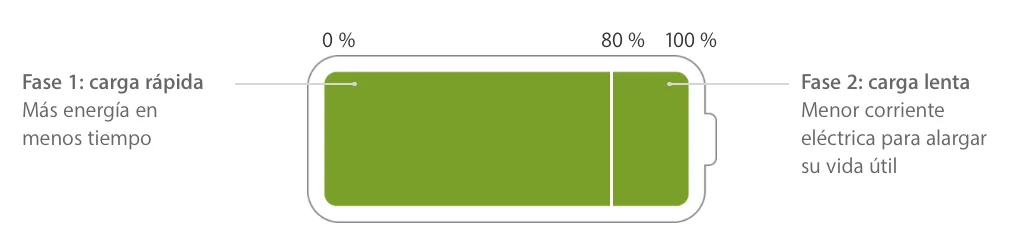
Charging at high temperatures can cause further damage. Software may limit charging above 80% when recommended battery temperatures are exceeded. Even storing a battery in a hot environment can damage it irreversibly.
When using the device in a very cold environment, battery life may decrease temporarily. Once the battery returns to its normal operating temperature, performance should return to normal.
Comfort zone for iPhone, iPad, iPod and Apple Watch
Remove certain cases while charging
Some cases can create excess heat, affecting battery life. If the device gets hot while charging, take it out of the case first. For Apple Watch Edition models, the original text refers to opening/removing the cover of the magnetic charging case; that wording requires technical review.
If storing the battery for a long time, consider these tips
Two key factors affect a device's battery condition during long-term storage: ambient temperature and its charge level when turned off for storage. The article therefore recommends:
Do not fully charge or fully discharge the battery; charge it to between 40% and 80%. Storing it completely discharged can cause a deep-discharge state in which it cannot hold a charge. Storing it fully charged for a long time can reduce capacity and battery life.
If storage lasts more than six months, check the device again and, if necessary, recharge it every six months to help prolong battery life.
After prolonged storage, the battery may be very low when you turn the device on again. It may need more than 30 minutes on the original adapter before it can be used.
About charging speed
The article explains that newer Apple devices charge more quickly up to 80% capacity, then slow charging from 80% to 100% to protect the battery and extend its life.