
Avoid blurry photos in low light: know when to hold still, when to look for more light and what Night mode on your iPhone does.
Understand why the photo comes out blurry
In low light, the camera may need more time to collect information. If the phone or the subject moves during that time, the photo can blur even though you tapped to focus. A scene lit by a lamp or a storefront is usually easier than total darkness.
Night mode exists on supported models and cameras, and not every lens on the same iPhone offers it. In low light it turns on automatically and shows a button with a moon and a capture time. Tap that button to turn it off or back on.
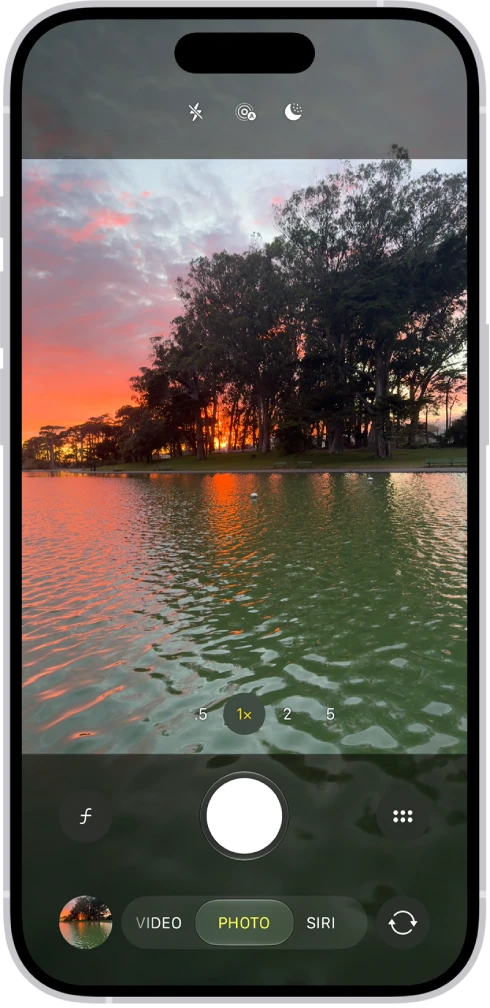
Take a night photo step by step
- Clean the lenses to reduce halos around lights.
- Choose a moderate zoom and support the phone when you can.
- Frame the shot and watch whether Night mode turns on.
- To change the capture time, tap the Camera Controls button in the top-right corner, tap Night Mode and choose one of the exposure options.
- Tap the Shutter button and hold the iPhone still until it finishes. If crosshairs appear in the frame, align them.
- Enlarge the picture to check it.
Retake the shot if the lights lost detail or the subject came out blurred. To lower the exposure, tap the subject on the screen and drag down the control that appears next to the focus area. Moving closer to a light source also helps.
Photograph people and pets, and decide about flash
For someone who is moving, find more light and take several shots. Do not expect a long exposure to freeze a child or a pet.
- To control it, tap the Flash control above the camera frame: it switches between Auto, On and Off.
- Flash can light a nearby subject, but it can also create hard shadows and reflections.
- Flash does not light a distant landscape.
- Do not turn it on where it disturbs, is prohibited or could distract someone. Soft light that is already there may look more pleasing.
Combinations of Night mode with Portrait depend on the model. They are not available on every iPhone.
Edit with realistic expectations
Brightening a dark photo a lot can reveal noise and lose color. Editing does not automatically recover detail that was never captured. Keep the original and apply moderate adjustments.
YOUR TURN
Try it now
You did it if you have two photos of the same object and can say which of the two keeps more detail.
Your progress is saved only in this browser. No sign-up.